



When Power Platform Sprawl Hits, the CoE Toolkit Starts to Matter
A few months ago, a client’s CIO asked me a simple question. “Can you show me, on one screen, every app, flow, and
custom connector in our tenant, who owns them, and which ones we can safely turn off?”
Their teams had built hundreds of Power platform automations over the years. No one had a single view of what still
mattered, what was stale, or where the real risk sat. The Admin Center could answer parts of that question, but not in a
way the CIO or company leaders could use in a live decision meeting.
That is when the pattern became clear to me. The Power Platform Admin Center works well in the early stages, when you
have a handful of environments and a small maker community.
Once usage grows across regions and business units, it starts to feel like flying a plane with half the cockpit
instruments missing. You see environments and capacity. You do not see the full story of ownership, risk, reuse, and
waste.
In this blog, I want to share what I have learned from those client conversations, when Power Platform usage moves from
experimentation to scale. What governance gaps appear, where the Admin Center falls short, and how the CoE Toolkit has
helped me close some of those gaps in real projects.
My goal is simple. If you own Power Platform at scale, you should walk away with a clear understanding of when the CoE Toolkit
is worth your time and what to watch out for before installing it.
What My Clients Really Expect from Power Platform Governance
When I speak with clients, their asks boil down to a few clear expectations from governance, not feature lists.
- Show Me Everything in One Place
Leaders want one view of every app, flow, virtual agent, and connector across the tenant. They expect to see who
owns what and a list of apps that can be reused in other regions, rather than rebuilding the same thing. - Tell Me What Is Unused or Risky
They ask which apps have not been accessed for months and which components have gone untouched. They also want
to know where power platform automations run without an owner or solution, because that is where hidden risk
usually sits. - Help Me Build with Intent, Not Chaos
Clients seek a central space for standards, workshop content, best practices, templates, and examples of
successful builds. Some also want a simple way to size an idea and get a rough view of effort and ROI before
they approve it. - Keep Everyone Informed When Rules Change
When data loss prevention (DLP) rules or guardrails change, they want makers to be notified inside the platform,
not via a one-time email. A simple screen that explains what changed, why, and what to do next is often the ask.
This is usually the point where someone asks, “But we already have the Power Platform Admin Center, why do we need
anything else?”
Where the Power Platform Admin Center Falls Short
The Admin Center excels in a few areas. It shows environments, capacity, DLP policies, and basic usage. You can manage
roles, onboard users, and gain a high-level understanding of activity. It provides details of apps, flows, etc., as per
the selected environment, but not in a consolidated manner.
It does not meet the expectations we just covered. It does not give a clean inventory of every app, flow, and connector
with clear ownership. It does not highlight unused or risky assets in a manner that enables business leaders to take
action.
It does not provide a central place for standards, workshop content, or rough ROI views. And it does not help you
explain policy changes to makers inside their day-to-day tools.
How the CoE Toolkit Actually Helped in My Work
Once those gaps became clear, I stopped treating the CoE Toolkit as “nice to have” and started using it as the primary
means to make Power Platform governance a reality in client work.
Making Tenant Level Visibility Real
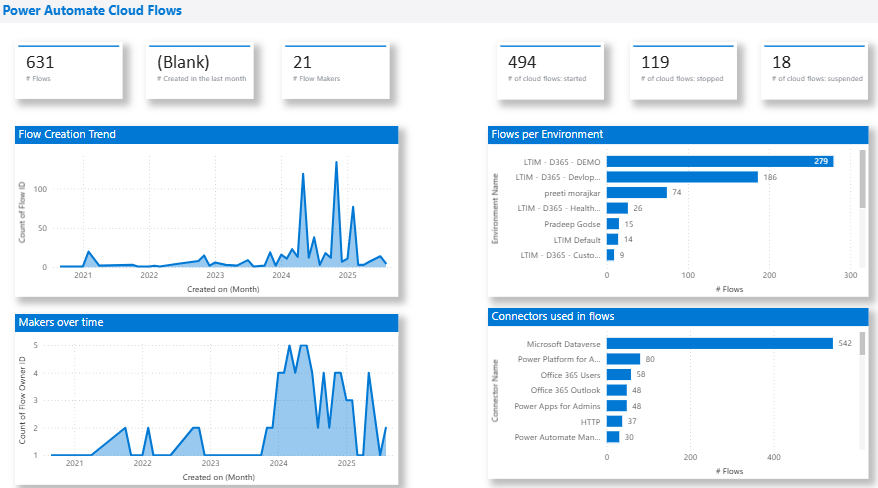
For one global client, the CoE Landing Board and Power Apps overview reports finally provided us with a single list of
every app, flow, and component across the tenant, including owners and countries. That simple view changed meetings with
CIOs and country heads from guesswork to concrete decisions on reuse and consolidation.
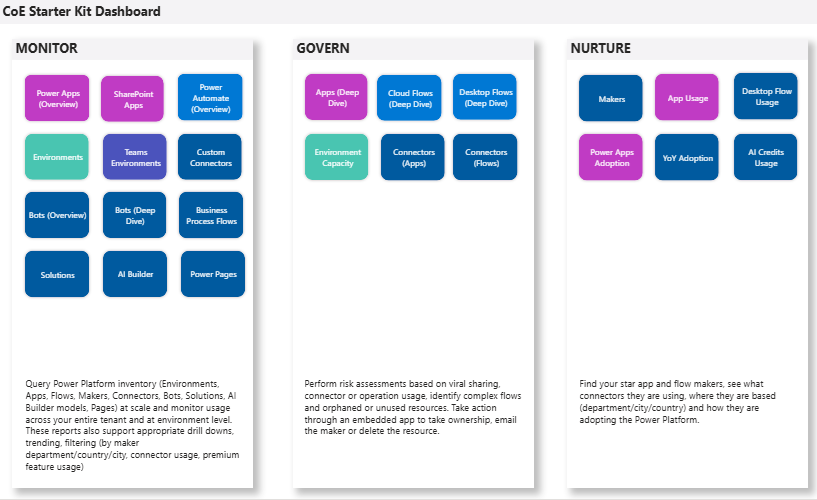
connectors, environments, and owners
Finding Waste, Risk, and Ownership Gaps
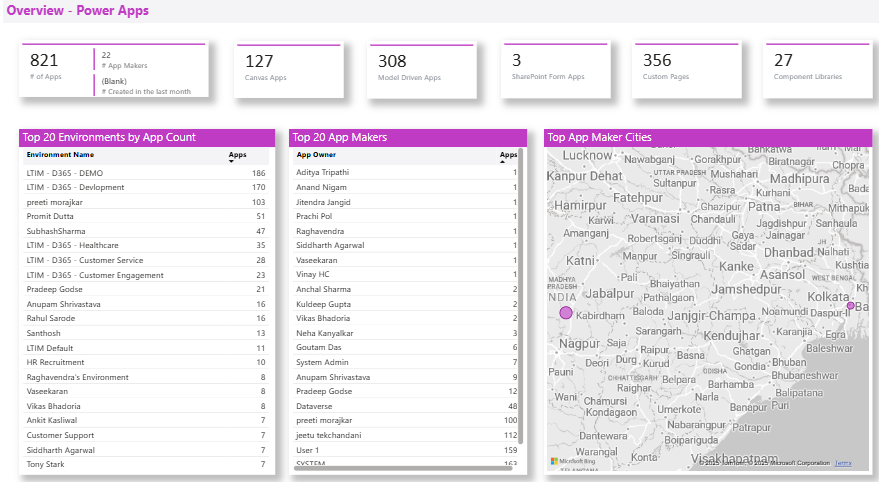
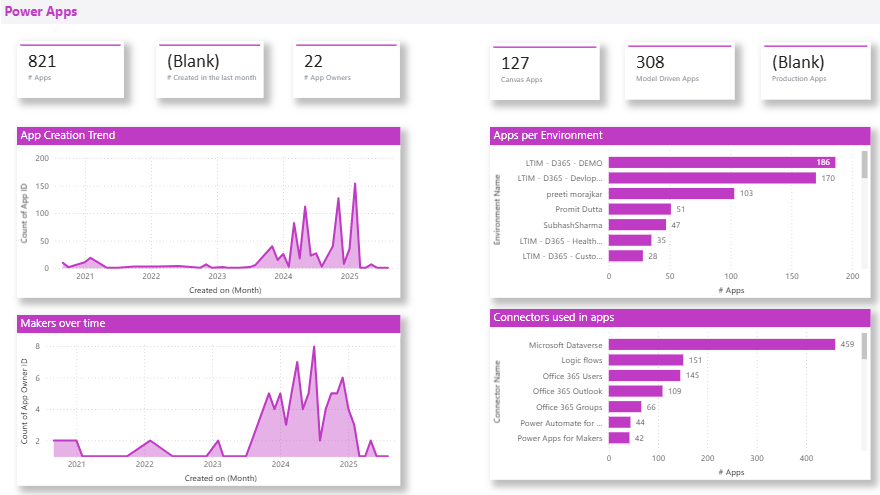
Another client utilized the Power Apps overview, App Archive, and Compliance and Governance reports to identify
apps/flows that had not been triggered or accessed for months, unchanged components, and custom connectors in critical
flows without a clear owner or solution.
That gave us a focused list of what to retire, fix, or assign, instead of a vague sense that “there might be risk.”
Turning CoE Data into Better Decisions
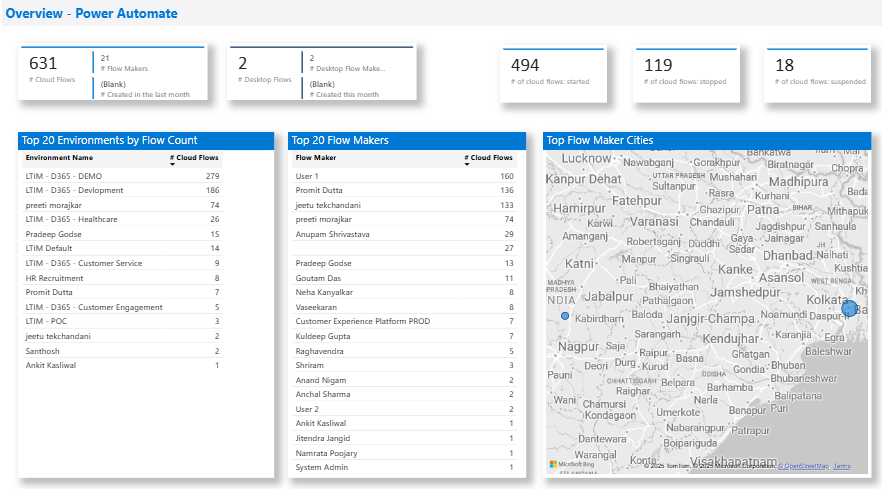
The built-in Power BI reports, such as Maker activity and Power Apps analytics, along with the Dataverse tables behind
them, helped us answer a simple question with our business teams. Build, reuse, or retire. In several workshops, we
utilized these views to evaluate new ideas and discuss preliminary costs and benefits before any development commenced.
That gave us a focused list of what to retire, fix, or assign, instead of a vague sense that “there might be risk.”
What Works Well and Where You Still Need to Be Careful
| What I Like About the CoE Toolkit | Where the CoE Toolkit Needs Careful Handling |
| Pre-built starter that avoids a blank slate and still allows extensions with custom apps, flows, and reports. | You still need a governance plan. Policy, naming rules, and environment strategy do not come from the toolkit. |
| Setup is primarily installing and configuring with the correct admin account, rather than a lengthy custom build. | You must define ownership. Who maintains the CoE, who reviews data, and which licenses and service accounts it depends on. |
| Built-in Power BI reports transform the way you communicate with business and IT by providing clear views of usage, ownership, and activity. | Reports do not solve anything on their own. Without action, owners make them static dashboards. |
| Storing everything in Dataverse makes it easy to build extra apps or insights on top of the CoE data. | Dataverse must adhere to your security and retention rules, or the CoE can become another potential exposure point. |
| It gives a shared language for makers, platform owners, and security teams. | It is not a magic fix. It surfaces facts. People and processes still decide what to retire, reuse, or restrict. |
If You Are Considering the CoE Toolkit, Start Here
If I had to roll out the CoE Toolkit again, I would begin with a few sharp moves that keep it focused and practical:
- Pick one question to solve in the first 90 days and build around that.
- Bring security and audit in early so the data matches their needs.
- Form a small group that reviews CoE data monthly and takes action accordingly.
- Establish clear guidelines for when apps, flows, or connectors require review.
If you treat the CoE Toolkit as a product with clear owners and decisions, it will pay you back. If you treat it as
another download, it will only give you more screens.
References
- Microsoft Power Platform Center of Excellence (CoE) Starter Kit, Learn Microsoft, 2025:
https://learn.microsoft.com/en-us/power-platform/guidance/coe/starter-kit/ - Power Platform Center of Excellence (CoE) Starter Kit overview, Learn Microsoft, 2025:
https://learn.microsoft.com/en-us/power-platform/guidance/coe/overview/
Blogger's Profile

Jeetu Tekchandani
Associate Principal Architect, LTIMindtree
Jeetu Tekchandani is an Associate Principal Architect at LTIMindtree with over 20 years of experience in Microsoft Dynamics 365 CE and Power Platform. He leads business solutions, from greenfield projects to legacy system upgrades, ensuring scalability. He established a CoE for a top Switzerland-based escalator and elevator company and has supported similar initiatives across the US, EMEA, and APAC.
Latest Blogs
Introduction There is a lot of noise around Agentic AI right now. Every headline seems to…
Traditionally operations used to be about keeping the lights on. Today, it is about enabling…
Generative AI (Gen AI) is driving a monumental transformation in the automotive manufacturing…
Organizations are seeking ways to modernize data pipelines for better scalability, compliance,…
